
Have begun work on an Achievement system for flyff private servers. Much like XBOX360's achievement system. In the hopes of making private server playing fun, I will release the system as well as the remote system as soon as possible.
More details to follow...
Monday, October 19, 2009


Thursday, October 15, 2009
1a C++ 101: Crash Course in C++
First off, I'm not going to elaborate too much because you should already know a basic understanding of hwo to program. If not, then I suggest googling programming in c++ because this might be a little over your heads. Anyway, I'm going to go over some of the details involved in creating a pserver in c++. Mainly some of the procedures and what they mean, and how to work with files and headers.
1. Files and Headers
When you create a new file in c++ its always a good practice to set up a corresponding header for all the variable, function and method declarations. For example if you have a file called server.cpp, you should create a header named server.h. This tells the compiler to look for the header of the same name to compile all the instructions for the cpp file. An example would be if you have a function in the cpp file and you don't declare it in the header, the compiler will give a linkage error at the end of compilation. Remember to declare all the variables and functions in the header file and then use the functions in the cpp file.
Let's look at an example. I'm going to use PasteBin for these examples so let me know if the pages get removed after a period of time.
So here is an example of a header file and its corresponding cpp file. I will be using Selector from the Connection project in the login server solution. Note that the connection project is shared across both solutions.
Selector.h
Selector.cpp
In the header file you will see that it defines the Selector class and inside the class it has all the variables and declarations needed for it. Notice how you don't see much definition to the class functions. That's because we will detail them in the cpp file.
So now you might be asking, well that's good and all but whats up with the Selector:: stuff?
Good question. In programming you have what's called a namespace and in lehman's terms its how far the function can be seen. Meaning you can't call the function outside the selector class if you don't use the Selector:: namespace first. Should you go ahead and call it, you will get compiler errors. Not a good thing. So its always best to define the namespace in front of the function you are creating. That way all you need to do is include the header file of the class and you can use the function anywhere its included.
Now I'm going to talk about the different types of functions inside the classes. For example, you will and should know what void, int, bool, etc are when defining the type of function you want. So here are some examples of each one (not all because they can be infinite if too technical):
Void - This function simply runs from beginning to end and does not return a value. No end result. All results are done in function and that's all there is to it. The program will keep running after the function is complete.
Int, Bool, Short, etc - These type will return a variable in some form. Be sure its the type of variable you want otherwise you will run into conversion problems. Let's say you have an integer variable declared. You are making a function that will populate that variable. It is common sense to make the function return an integer variable and not a boolean variable.
Object variable functions - These will probably be discussed later in the lessons but for now know that they return an entire object complete with all its own variables and methods and functions. Usually passed into other functions altogether but they function just like variable return functions.
I hope this has given a little more knowledge on how things work inside c++ and every progam solution here on out.
Feel free to post comments, concerns and feel free to contact me with the same. Serious inquiries only and make them short and to the point otherwise I may need to charge for my services which is unnecessary when teaching for free.
Look for part the next chapter when we start looking inside the socket structure of the server and see how it functions.
1. Files and Headers
When you create a new file in c++ its always a good practice to set up a corresponding header for all the variable, function and method declarations. For example if you have a file called server.cpp, you should create a header named server.h. This tells the compiler to look for the header of the same name to compile all the instructions for the cpp file. An example would be if you have a function in the cpp file and you don't declare it in the header, the compiler will give a linkage error at the end of compilation. Remember to declare all the variables and functions in the header file and then use the functions in the cpp file.
Let's look at an example. I'm going to use PasteBin for these examples so let me know if the pages get removed after a period of time.
So here is an example of a header file and its corresponding cpp file. I will be using Selector from the Connection project in the login server solution. Note that the connection project is shared across both solutions.
Selector.h
Selector.cpp
In the header file you will see that it defines the Selector class and inside the class it has all the variables and declarations needed for it. Notice how you don't see much definition to the class functions. That's because we will detail them in the cpp file.
So now you might be asking, well that's good and all but whats up with the Selector:: stuff?
Good question. In programming you have what's called a namespace and in lehman's terms its how far the function can be seen. Meaning you can't call the function outside the selector class if you don't use the Selector:: namespace first. Should you go ahead and call it, you will get compiler errors. Not a good thing. So its always best to define the namespace in front of the function you are creating. That way all you need to do is include the header file of the class and you can use the function anywhere its included.
Now I'm going to talk about the different types of functions inside the classes. For example, you will and should know what void, int, bool, etc are when defining the type of function you want. So here are some examples of each one (not all because they can be infinite if too technical):
Void - This function simply runs from beginning to end and does not return a value. No end result. All results are done in function and that's all there is to it. The program will keep running after the function is complete.
Int, Bool, Short, etc - These type will return a variable in some form. Be sure its the type of variable you want otherwise you will run into conversion problems. Let's say you have an integer variable declared. You are making a function that will populate that variable. It is common sense to make the function return an integer variable and not a boolean variable.
Object variable functions - These will probably be discussed later in the lessons but for now know that they return an entire object complete with all its own variables and methods and functions. Usually passed into other functions altogether but they function just like variable return functions.
I hope this has given a little more knowledge on how things work inside c++ and every progam solution here on out.
Feel free to post comments, concerns and feel free to contact me with the same. Serious inquiries only and make them short and to the point otherwise I may need to charge for my services which is unnecessary when teaching for free.
Look for part the next chapter when we start looking inside the socket structure of the server and see how it functions.
Tuesday, October 13, 2009
1.C++ 101: Everything you should know before developing a private server in C++
Before we get started, I should point out that you should download this file for reference. It will be the base of things to come and where I am getting all of my information/code from.
You can get the file here on RapidShare. If you want the file on another host, please let me know and I will be more than happy to upload it to multiple hosts.
Now that you have the file or should have it, let's look at what is inside the folder.
![]()
You can get the file here on RapidShare. If you want the file on another host, please let me know and I will be more than happy to upload it to multiple hosts.
Now that you have the file or should have it, let's look at what is inside the folder.
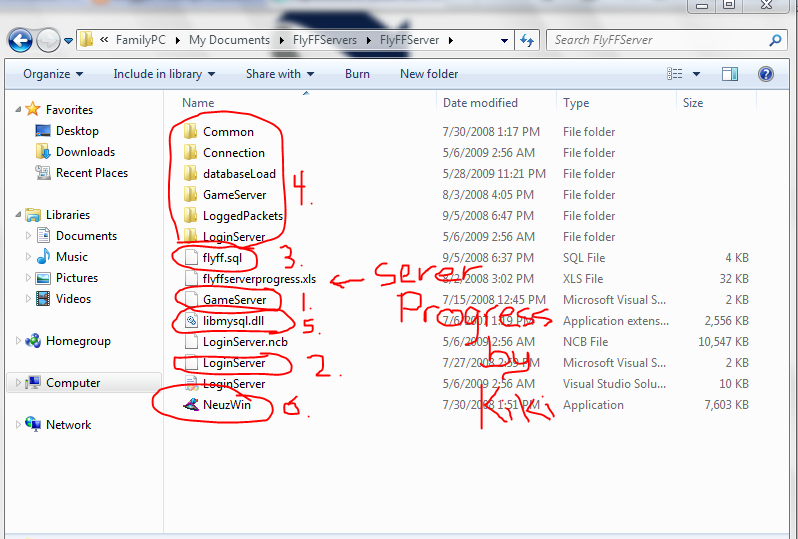
- GameServer.sln - This holds all the project files needed for the Game or World Server.
- LoginServer.sln - This holds all the project files needed for the Login and Character Server.
- flyff.sql - This is a very basic and outdated sql file. Run it in mysql to install the database. Discussed later on.
- These are project folders for each solution. The Common and Connection folders are dll project files that are linked in each solution. Discussed later.
- libmysql.dll - Needed to execute all the database functions and methods. Discussed in Database section.
- NeuzWin - A version 6 client with GG turned off. Vista has problems with it shutting down. Something about Data Execution Prevention. Add an exception and you should be fine.
I'm going to leave this part as done. Look for the next part of Section I which will show you some basic C++ functions and habits to get into when developing in C++.Net.
A Complete Look-At for FlyFF Private Servers in C++.Net
So I decided to break down all the parts of DragonSource into a viable and customizable to series to anyone can create a FlyFF private server. They will be broken down into the following parts:
- C++ 101: Everything you should know before developing a private server in C++
- The Packet System: Sending and Receiving Packets
- Server Core: Setting up a base for everything here on out.
- Database: Setting up and using MySQL for your project.
- Basic Player Construction
- Login Server
- Character Server
- World Server
- World Packets Part 1: Player Related
- World Packets Part 2: Item Related
- World Packets Part 3: Mob Related
- Future Developments to be announced.
Subscribe to:
Comments (Atom)